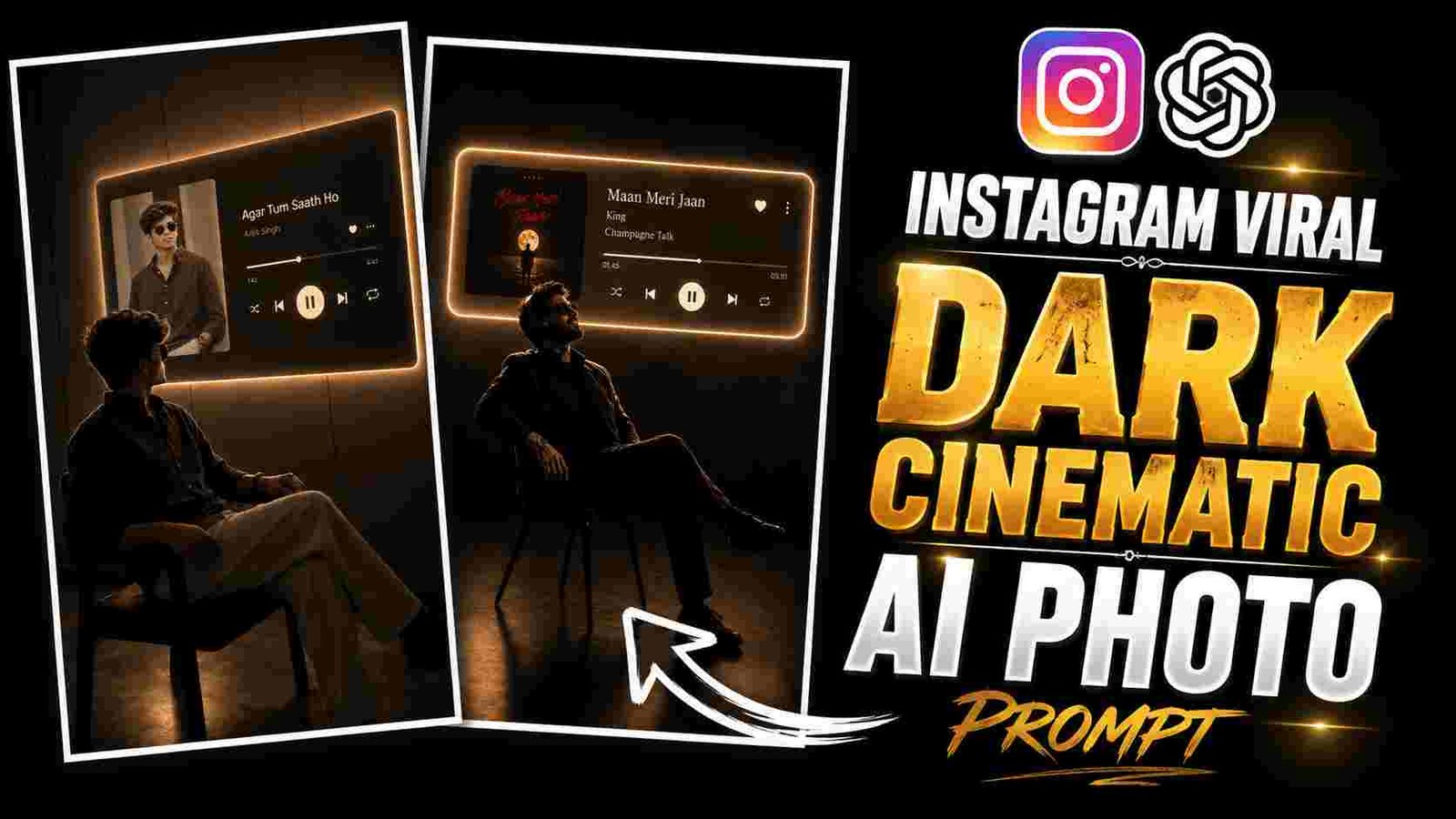
Cinematic Ai Photo Prompt – So friends, nowadays with the help of AI photo editing, it has become very easy to change any ordinary photo. In to a different creative and cinematic style. For this reason. There is also an interesting music player AI photo editing style in which a normal photo. A person sits in a dark, premium music player setup. Friends, in this type of image, the person is seen. In a cinematic pose while the music player panel is visible, which looks very unique. In this, not only the photo of the person is changed but friends, the entire image is given a special music lighting environment look. It has an illuminated music player screen in the background, the name of the song and even the name of the artist. You will get to see the name which is the progress bar. Elements like music control icon and album artwork are also visible here. The right complexity between the person sitting in front and the amazing music player interface visible behind makes this image quite attractive. To create such photos, friends, you do not need to use any composition photo editing software or edit manually.
In this article, I am going to give you complete information about ISI ChatGPT music player AI photo editing, how you can make it with the help of ChatGPT, which prompts you should use, I am going to give you all this in detail here, after which you can also customize this type of photo as per your choice.
What Is Music Player AI Photo Editing?
This music player AI photo editing is a creative AI photo editing concept in which any of your ordinary photos can be transformed into a premium music lighting scene. In the generated image, the person is seated in an amazing cinematic environment and a large illuminated music player interface is created behind him which looks quite unique. The specialty of this style is its dark background and a nice soft glowing lighting which makes this image quite special. In this, many more elements like song title, singer, artist name, album artwork, progress bar and playback controls have been added in the music player panel. Due to this, friends, this image looks quite unique and it seems as if A person is sitting in front of a large digital music player, listening to and enjoying their favorite song.
Create Music Player Ai Photo in Chatgpt
To make a music player AI photo, first of all friends, you have to prepare a clear and good quality photo of yours in which your face is clearly visible and you have to try that your face should not be spoiled at all in the photo and the image should not be too bloody or of low quality at all. After this, you have to upload your photo in ChatGPT and paste the secret given by friends along with it. After sending the prompt, friends ChatGPT will understand your reference photo well and on the basis of that, will prepare a new music player style scene for you. In this, friends, you will see the image of your photo. Along with a nice dark cinematic background, the glowing music player panel will generate elements like album artwork. Different music controls. If you need to keep details like the name and artist of a particular song. as per your requirement. This way you can also change the album artwork or the overall environment as per your liking. After the generated image is generated, you have to check it carefully.
Cinematic Ai Photo Prompt

Music Player Ai Photo Editing Prompt
Now friends, with the help of the secrets below, you can easily. Create your own music player AI photo editing style. Before using each prompt. Upload your high-quality reference photo. To ChatGPT and copy the prompt and submit it to the prompter to generate the image. You can use this prompt to create a new image with your song detail. Album art work and visual arrangement and for better results you must keep the reference photo. Clear and of good quality resolution in which your photo should look absolutely clean.
Customize Your AI Music Player Photo
You can customize the generated music player AI photo to your liking. If you want to change the song name, artist name, album artwork, music player screen design, or design, you can edit the relevant details in the prompt. Furthermore, you can also change the background mood, lighting, outfit, sitting position, and overall cinematic environment to your liking. As I’ll give you an example, you can also create a new image with the same concept by entering the name and artist of another song. If the result isn’t to your liking the first time, you can delete the same prompt. There is no need to change it, Chad GPT just needs. To tell you about that particular change. That you can easily create many different variations from the same editing concept.
Last Word
So this music player is a very creative way of photo editing in which you can give your normal photos. A different look and premium cinematic style. With the help of ChatGPT and correct secret Cinematic Ai Photo Prompt. You can combine many elements like music player interface, album artwork, song. Details and cinematic environment in a single image which looks really unique. If you’d like to transform your photos into some of these unique music theme designs. You can use the prompts above with your reference photo. To create your own unique style of photo. Customizing the prompt based on your preferred song artist and visual detail. Keep visiting our website for more AI photo editing prompts and VN template viral editing tips.